
March 5, 2024
Solved

E-Filing IPPIN box is 5 digits, my IPPIN # is 6 digits

  • March 5, 2024
  • 1 reply
  • 0 views

When you are asked to enter the IPPIN # on the E-File section it's only accepting 5 digits and the IPPIN # is 6 digits.


Way to go Turbo Tax

    Best answer by rjs

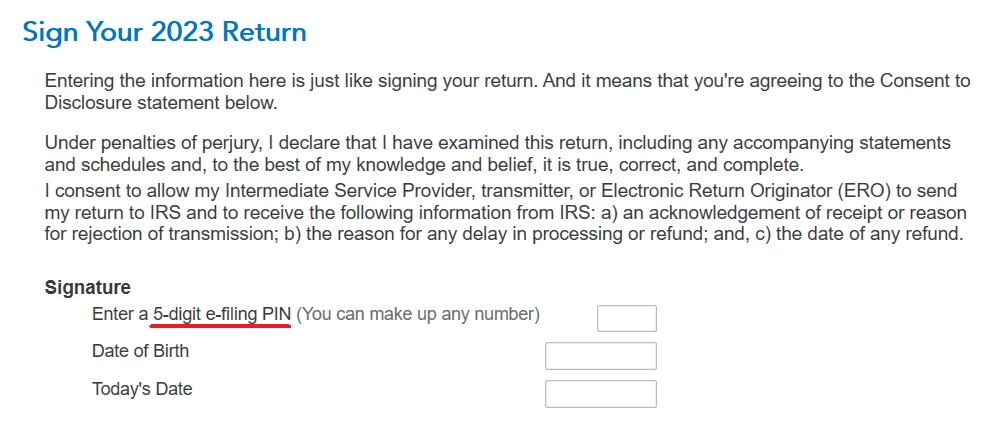
    The e-file section is not asking for your IP PIN. It's asking for a 5-digit e-filing PIN. Read the screen carefully. See the screen shot below. You can enter any 5-digit number of your choosing. (It says on the screen "You can make up any number.)


    You do not enter your 6-digit IP PIN in the e-file section. To enter your 6-digit IP PIN, type "ip pin" (without the quotes) in the Search box, then click the link that says "Jump to ip pin."


    1 reply

    rjs
    rjsAnswer
    March 5, 2024

    The e-file section is not asking for your IP PIN. It's asking for a 5-digit e-filing PIN. Read the screen carefully. See the screen shot below. You can enter any 5-digit number of your choosing. (It says on the screen "You can make up any number.)


    You do not enter your 6-digit IP PIN in the e-file section. To enter your 6-digit IP PIN, type "ip pin" (without the quotes) in the Search box, then click the link that says "Jump to ip pin."


    April 16, 2025

    I entered 5 digit PINS as instructed in Turbo Tax. Both returns were rejected for incorrect PINs. The Turbo Tax instructions state that in the cast of the PIN not being accepted, we should go to www.irs.gov/get-an-ippin. I did as the Turbo Tax instructions indicated and got my SIX DIGIT ippin to file my return. The IRS states that this 65 DIGIT pin is required to E File the return. The Turbo Tax page to enter the pins will not accept the IRS SIX DIGIT pin. Using the actual IRS pin means that the page gives an error message that incorrect or extra digits are used.


    I tried again to submit my taxes and they were rejected again.

    April 16, 2025

    @ yutjwe75 wrote:

    I entered 5 digit PINS as instructed in Turbo Tax. Both returns were rejected for incorrect PINs. The Turbo Tax instructions state that in the cast of the PIN not being accepted, we should go to www.irs.gov/get-an-ippin. I did as the Turbo Tax instructions indicated and got my SIX DIGIT ippin to file my return. The IRS states that this 65 DIGIT pin is required to E File the return. The Turbo Tax page to enter the pins will not accept the IRS SIX DIGIT pin. Using the actual IRS pin means that the page gives an error message that incorrect or extra digits are used.


    I tried again to submit my taxes and they were rejected again.


    You didn't post the original rejection error code, which might have been helpful.   So we don't know exactly what your rejection is.  It may or may not have been an IP PIN issue in the first place; it could have been an AGI/PIN issue, which is different from IP PIN issue.


    You also didn't say if this was a single return or a married filing jointly return.


    In any case, going by what you have related, and since you now have an IP PIN, you do have to enter it.  But you're trying to enter the 6-digit IP PIN in the wrong place.   It's not entered in the FILE section.  The 6-digit IP PIN is entered this way:


    In the left column menu, choose Federal tab

    Subtab Other Tax Situations

    Scroll down to Other Return Info

    Expand that topic and choose Identity Protection PIN.


    You will still need to enter a 5-digit PIN on the Signature page to "sign" your return.  It's on a page with today's date and your birth date.   Like it says there, those 5 digits can be any 5 digits of your choosing (except can't be all zeros.)


    Since I don't know what your original rejection error message was, it's still possible you will get a rejection if the original rejection didn't specifically say IP PIN or Identity Protection PIN in it.




